


While you use the Windows 10, 8 or 7 system, are you getting a WerMgr.exe or WerFault.exe Error? If you are, then this is just the right article for you.
Here, in this article, we will talk about the WerFault.exe Error, its causes and the different ways in which you can fix it.
WerFault.exe Error
WerFault.exe or WerMgr.exe Application Error is a very irritating error that appears every time when user tries to execute any installed applications or services.
It is one of the most irritating errors that appears every time the user tries to execute any installed applications or services.
The WerFault.exe is an important process that is responsible for the Windows Error Reporting service.
CAUSES: WerFault.exe Error
The WerFault.exe Error is mainly caused by the corruption of the WerFault.exe.
Due to several causes, the essential system files get damaged or corrupted. Some such causes are:
- The WerFault.exe file can be affected by some computer Viruses.
- If the WerFault.exe files are replaced by other system files.
- If the WerFault.exe files are unintentionally deleted.
- If any app is improperly installed or uninstalled.
You can follow the steps given below to fix the WerFault.exe Error.
FIXES: WerFault.exe Error
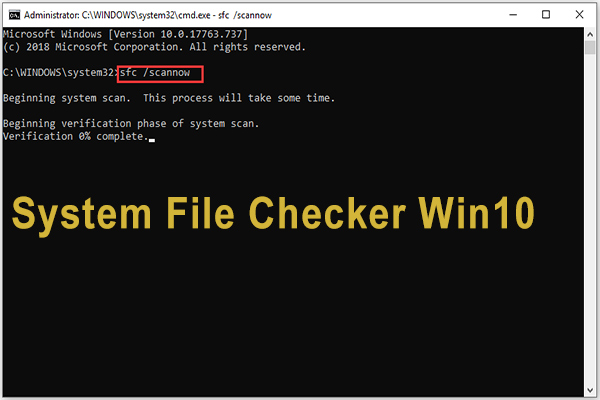
1. Run SFC System file scanner
Just follow the guidelines given below to run the SFC scan:
- You have to first insert a USB drive or an installation disc into your Windows 10 PC and restart your system from the drive.
- Then you can move to Repair your computer, then get in Choose an option screen, and then selectTroubleshoot.
- Then, on the Advanced options page click on Command Prompt
- And type the sfc /scan now as the cmd window is opened and hit Enter.
- Then wait for the scanning process to finish.
After the scanning process is finished, restart your computer.
2. Run the Windows Memory Diagnostic tool
This is a system memory test that can help you to check the computer's RAM for problems. There will be a status bar during the test process showing you if there are any problems detected. Thus, it also helps in checking the WerFault.exe Error.
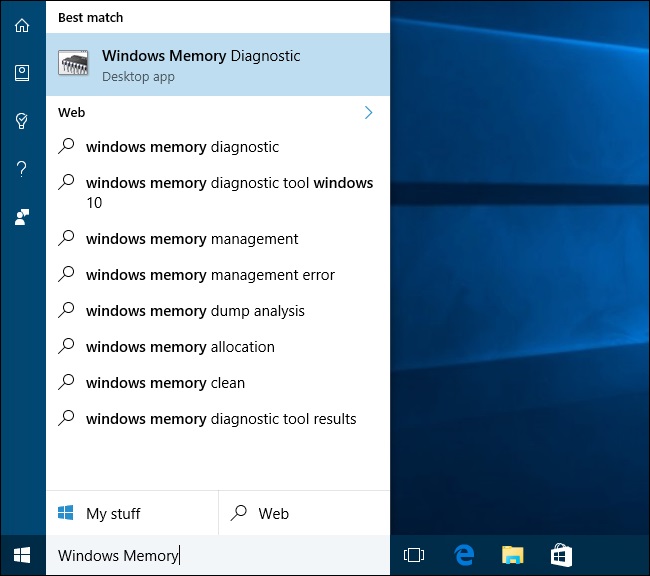
1. Just open Windows Memory Diagnostics by searching it from the search box.
2. Then, click on restart now and look for the problems.
Then just repair the problems that have been detected and restart your computer.
After restarting the computer, check if the WerFault.exe Error is fixed.
3. Try to Reinstall Display Drivers
Display drivers can also cause the error. This is how you can update the faulty display drivers:
1:Press Windows + R keys from your keyboard to open the Run dialogue box.
2: Type devmgmt.msc and press the Enter key in the box.
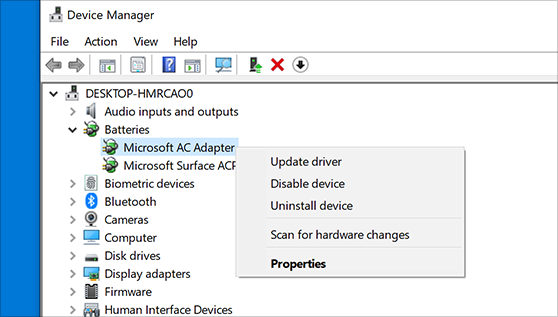
3: The device manager will be opened. Now, click on the Display adaptors to expand it.
4: Then, uninstall the drivers.
5: Then, click on the Action tab and on Scan for hardware changes.
The device manager will then scan and install the updated missing hardware drivers automatically.
4. Turn off the Windows Error Reporting Service

This method will surely help you if you are still unable to fix the WerFault.exe error.
1: Press Windows + R keys from your keyboard to open the Run dialogue box.
2: Type services.msc and press the Enter key in the box to open the Service Manager.
3: Then, find the windows error reporting service from the list and double-click on it.
4: Choose the startup type as disabled.
5: Then, click apply and press OK. Now restart your computer.
Windows Repair Tool
If the methods given above don't work for you to fix the WerFault.exe Error, then you can run the Windows Repair Tool.
It can very effectively encounter the WerFault.exe Error.
.
Conclusion
So if you are facing the WerFault.exe Error you know what to do to fix it.
Share your experiences with us in the comment section.
All the best!



