

What are PATs?
PATs are the Personal Access tokens or GitHub Access Tokens that are strings of non-human-readable characters. These Github access tokens are used for the authentication of a user. PAT has replaced the method of old password-based authentication.
Instead of typing in your password for Git, you will enter your GitHub Access token. You can also choose to cache the token forever, so you don’t have to enter it all the time.
So Let's see -
How a GitHub Access Token is Generated?
- In order to create a GitHub Access Token, you'll need to verify your email address.
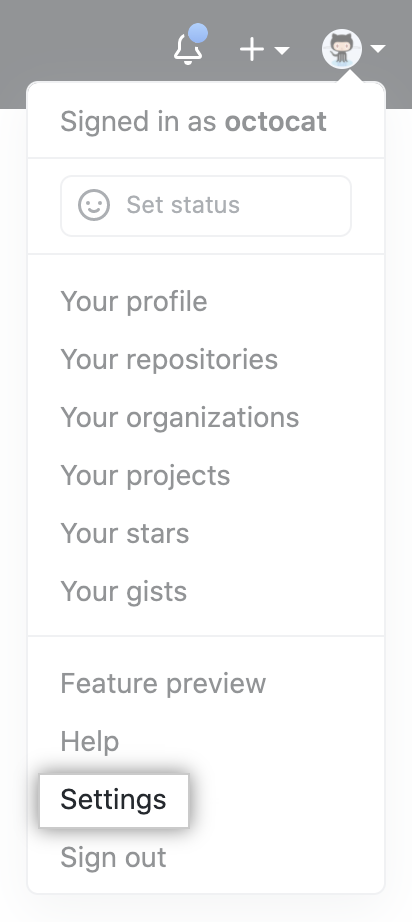
- In the upper-right corner, click on your profile photo and then the settings button
- There you will see Developer Settings, Click on it.
- Then in the left-sidebar, Click on personal Access Tokens and Click on Generate New Button.
- You need to give a name to your token.

- Alright Now, Set an Expiration date for your token. You can select from the default time period or you can use the calendar picker.

- Finally, you have to choose the scope of this token. This will allow or disallow certain actions.

- Now click on Generate Token.

The token will look like this -
ghp_cgq4ZrHmFu0lLPl7ajKAwgMPnT5zhF00000
Note: Make sure to not share this token with anyone, it works as your password.
Set Up GitHub Access Token
- For Windows - If you are using native Git then you can open the "Manage Windows Credentials" from the Control Panel and can edit or add this token to git:https://github.com.
- For macOS - You can use the Keychain Access app. You will need to search for github.com and find the internet password and then you can change the key
Conclusion
Now, you are able to create your own GitHub Access Token or PAT.



