

Many of us won't recall our home Wifi password when asked for, because we don't have to enter it into our devices every day. When you set up a new Wifi, you provide the password and then every device remembers the authentication password and generally connects to the Wifi network, whenever it is available.
So if you have also forgotten your Wifi password, but your Macbook is still connecting with it automatically, then you can find and view your saved wifi password from your Macbook, using the Keychain Access app in macOS.
View Saved Wifi Password in Mac:
Follow the steps mentioned below to see the saved Wifi password in your Macbook Air or PRO or just Macbook.
Step 1: Open the Keychain Access App
Start with opening the Keychain Access application. In Mac, you can click Command + Space to search for anything. So type in "keychain access" and you should be able to get to this application.

Step 2: Find the Wifi Network
Use the search bar to find the Wifi network for which you want to see the password.
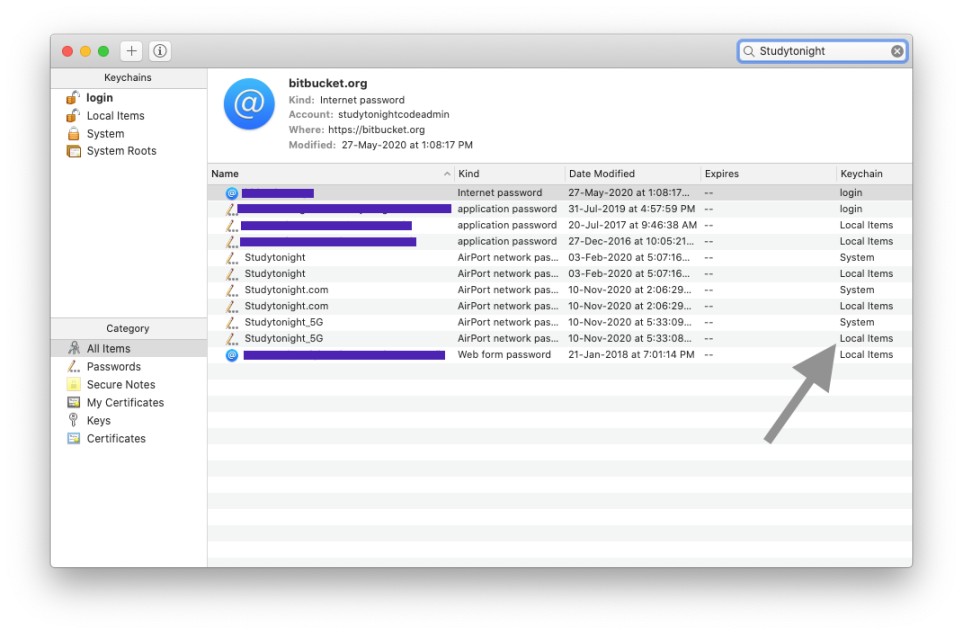
You will see two entries for all the networks, one would be System, and the other is Local items, we will use the Local items keychain to see the password.
Step 3: Show Password
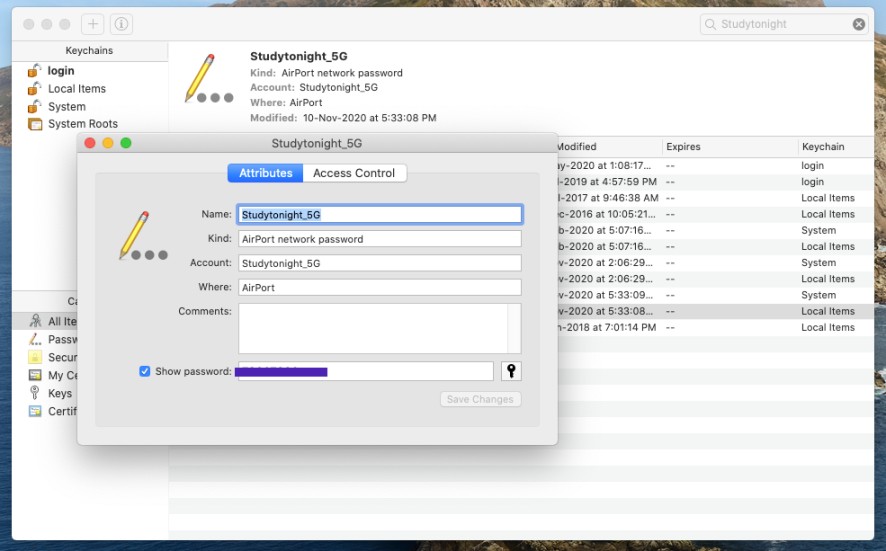
Double click on the network name and a window will open, click on Show Password check in the window to see the password.

You may be prompted to enter your System password, using which you log in to your Mac account.

And you get to see the password.
Conclusion:
Well we hope you were able to see the password of the Wifi network because I was able to check my office Wifi password using this step by step uide, so it must work for you too. But if you face any issue, let us know in the comment section below.


