Building a custom Port Scanner using Sockets
Till now, you must have gained enough understanding about sockets. Now, it's time to start with some practical uses of what we have learnt so far. From this lesson onwards we will emphasize on Cyber Security using Python.
What is a Port Scanner?
Well, consider a situation where you have to enter into a bungalow. How will you do that? The obvious answer is to search for doors leading into the bungalow. What if the doors are locked? Well, in that case you will scan every other door and windows of the house and you might find your way into the house.
Now, if you remember about ports from second tutorial of this series, you might remember that ports are like doors/windows in a system. So, the fundamental step to enter a system is to scan the system for opening ports. So, it is always adviced to close unnecessary ports of your system(server) to avoid any mishappening. For a web server port 80 is open by default for HTTP request and response.
In this lesson, we will learn how to make an elementary port scanner using which you can scan open ports of any web service.
port_scanner.py
#!usr/bin/python

#port_scanner.py

import socket

t_host = str(raw_input("Enter the host to be scanned: "))   # Target Host, www.example.com
t_ip = socket.gethostbyname(t_host)     # Resolve t_host to IPv4 address

print t_ip      # Print the IP address

while 1:
	t_port = int(raw_input("Enter the port: "))	   # Enter the port to be scanned

	try:
		sock = socket.socket()
		res = sock.connect((t_ip, t_port))
		print "Port {}: Open" .format(t_port)
		sock.close()
	except:
		print "Port {}: Closed" .format(t_port)

print "Port Scanning complete"
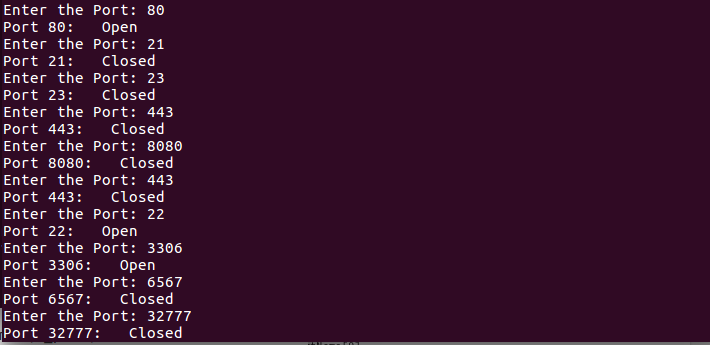
When you run the above program, it prompts you to enter a hostname(www.example.com) and then it keeps on asking for port numbers you want to scan.
To terminate the program, press Ctrl + C.
Output: