Home/Tutorials/Drools Business Rules Engine/How to create Drools Runtime
Drools Business Rules Engine2 min read

How to create Drools Runtime

Drools Runtime is required to tell the editor to run the program with specific version of drools jar.

How to create Drools Runtime

Drools Runtime is required to tell the editor to run the program with specific version of drools jar. You can run your program/application with different Drools Runtime.

Click on Windows -> Preference -> Drools -> Installed Drools Runtime

Then click on Add
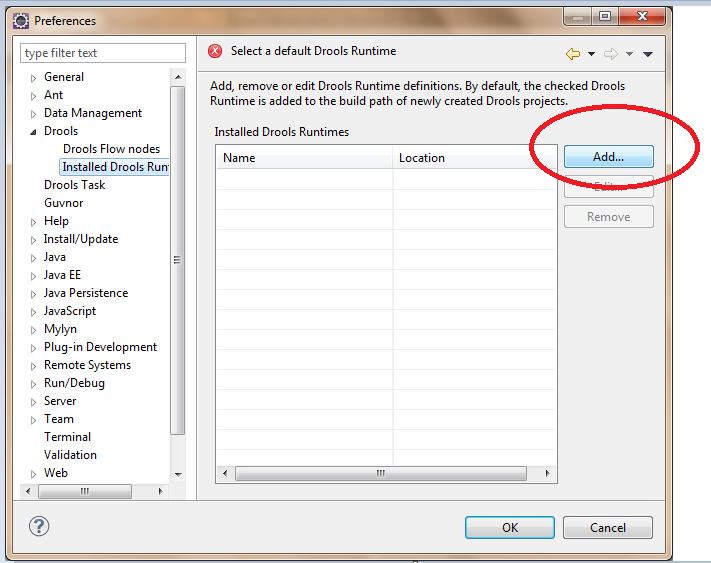
How to create Drools Runtime


Then click on Create a new Drools runtime button
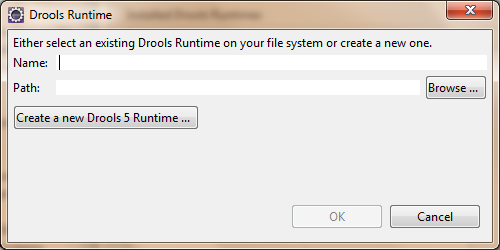
How to create Drools Runtime


Give the path till the binaries folder where you have downloaded the droolsjbpm-tools-distribution-5.3.0.Final.zip

Click on ok and give any name for the Drools Runtime. The drools runtime is created.



INTERACTIVE SIMULATION CHALLENGE+250 XP
Workbench Verification

Ready to test "How to create Drools Runtime" in production?

See how Drools Business Rules Engine algorithms and server loops perform under 100k req/s traffic spikes.

Simulator: SysDesign Ops Simulator