REST: Creating the Registration Application
The prerequisites for developing the registration application are:
- Maven configured on the machine.
- Eclipse (IDE) installed on the machine.
- Apache Tomcat Server installed in the machine.
Steps of Development
- Choose the directory where you want to keep the files related to this application.
- Open the Command Prompt →
cd {your directory}→ run the below mentioned command in the command prompt.mvn archetype:generate -DgroupId=com.rest.tutorials -DartifactId=RegistrationApp -DarchetypeArtifactId=maven-archetype-webapp -DinteractiveMode=false
Make sure that Maven is setup before running the above command. This command will create the web application structure in your directory and
pom.xmlfile. Thispom.xmlfile is the metadata of your application.Your pom.xml will look something like this,
<project xmlns="http://maven.apache.org/POM/4.0.0" xmlns:xsi="http://www.w3.org/2001/XMLSchema-instance" xsi:schemaLocation="http://maven.apache.org/POM/4.0.0 http://maven.apache.org/maven-v4_0_0.xsd"> <modelVersion>4.0.0</modelVersion> <groupId>com.rest.tutorials</groupId> <artifactId>RegistrationApp</artifactId> <packaging>war</packaging> <version>1.0-SNAPSHOT</version> <name>RegistrationApp Maven Webapp</name> <url>http://maven.apache.org</url> <dependencies> <dependency> <groupId>junit</groupId> <artifactId>junit</artifactId> <version>3.8.1</version> <scope>test</scope> </dependency> </dependencies> <build> <finalName>RegistrationApp</finalName> </build> </project> - Now add Jersey dependency in the
pom.xmlfile, just like the Junit dependency is added.<dependency> <groupId>org.glassfish.jersey.media</groupId> <artifactId>jersey-media-moxy</artifactId> <version>2.25.1</version> </dependency> <dependency> <groupId>org.glassfish.jersey.core</groupId> <artifactId>jersey-server</artifactId> <version>2.22.1</version> </dependency> <dependency> <groupId>org.glassfish.jersey.containers</groupId> <artifactId>jersey-container-servlet</artifactId> <version>2.22.1</version> </dependency>code> - Run the command:
mvn eclipse:eclipseThis will generate a .classpath and a .project file so that you can import this project into the eclipse.
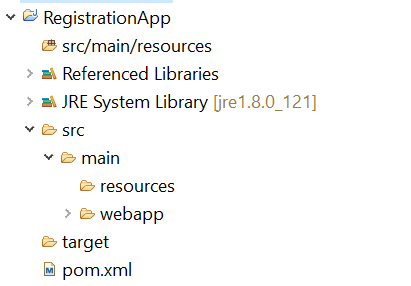
The project structure should look like this in the eclipse now.
